
Globe SIM Registration 2026: Register Your SIM Online Now
If you use a Globe SIM card in the Philippines, you must register it. This is now a legal rule under the SIM Registration Act (RA 11934). Whether you have a prepaid or postpaid SIM, registration keeps your number active, safe, and protected from scams or fraud. It also helps secure your personal information while making your mobile experience smooth and reliable.
You can register your Globe SIM online using the latest official portal: simreg.globe.com.ph/globe-digital-onboarding. Before 2024, Globe users registered via the old site: new.globe.com.ph/simreg. The new 2026 platform is faster, safer, and easier to use.
On the updated site, you can verify your information, upload a valid ID, and activate your SIM in just a few minutes. Registering today ensures you keep enjoying uninterrupted calls, texts, mobile data, and exclusive Globe promos across the Philippines.
Who Needs to Register Their Globe SIM?
All Globe users in the Philippines, whether prepaid, postpaid, or broadband, are required to register their SIMs in accordance with the government’s SIM Registration Act. This requirement helps protect your number from fraud, ensures secure connectivity, and keeps your mobile services active across Globe Telecom’s network.
Existing Globe Prepaid and Postpaid Users
If you use a Globe prepaid or postpaid SIM, verify your details via the SIM registration Globe portal. Failure to do so may lead to service disconnection or limited access to Globe features.
New Globe SIM Users
Customers who have purchased a new SIM must complete their registration for the new Globe SIM before using it. Registering ensures the immediate activation of your calls, texts, and mobile data services.
TM and Globe at Home Users
If you use TM or Globe at Home Prepaid WiFi, you must register your SIM. Go to the website or use the GlobeOne App. This keeps your account verified and prevents it from being deactivated.
Business and Corporate Subscribers
Companies with bulk or corporate Globe postpaid plans need to complete the Globe registration SIM process in their organization’s name. This ensures compliance with national registration laws.
Key Requirements for Globe SIM Registration
Before starting your Globe SIM registration, make sure you have the necessary details and documents ready. Globe requires all subscribers to provide a valid ID and accurate personal information. This helps ensure the SIM is legally registered and verified.
Basic Personal Information
To register your SIM card with Globe, you will need to provide your complete name, date of birth, gender, and current address. Ensure these details match exactly with the information on your ID to avoid rejection during the verification process.
For Globe Postpaid and Business Subscribers
If you are a Globe postpaid or corporate plan subscriber, your information is already in Globe’s system. You still need to confirm and update your details. Visit new.globe.com.ph/simreg or use the GlobeOne App to finish your Globe SIM registration.
For Minors and Assisted Registration
Minors must register their Globe SIM under their parent or guardian’s name using the guardian’s valid ID. For customers without internet access, Globe Stores and registration booths nationwide offer manual SIM registration assistance.
Valid IDs Accepted for Globe SIM Registration
You must submit one government-issued ID for your Globe SIM registration online. Below are the most commonly accepted IDs by Globe Telecom:
- Voters ID
- Passport
- Driver's License
- Social Security System (SSS) ID
- Philippine National ID (PhilSys)
- Professional Regulation Commission (PRC) ID
- Overseas Workers Welfare Administration (OWWA) ID
- Postal ID
- Senior Citizen ID
- Person with Disability (PWD) ID
- Unified Multi-Purpose ID (UMID)
- Bureau of Internal Revenue (BIR) ID
- Integrated Bar of the Philippines (IBP) ID
- Government Service Insurance System (GSIS) e-Card
What to Do If You Don't Have a Valid ID for Globe SIM Registration
If you don’t have an accepted government-issued ID, don’t worry, there are still ways to complete your SIM registration depending on your situation:
For Minors
The SIM must be registered in the name of a parent or legal guardian. A valid government ID will be required for the guardian. The minor’s personal details (full name, birthdate, address, etc.) must still be provided.
For Senior Citizens or Persons with Disabilities (PWDs)
They can register the SIM themselves if able. Alternatively, an authorized representative can register on their behalf. The representative must present their own valid ID and proof of authorization, such as a signed letter or authorization form.
If You Have No Accepted ID
Visit your local government office to obtain a valid identification, such as a National ID, Driver’s License, or Passport. Once you have your ID, you can register your Globe SIM online, through the app, or in-store.
Step-by-Step Guide to Globe SIM Registration via Online Portal

- Go to the official Globe SIM Registration Portal.
- Click the Register button to begin the Globe SIM registration process.
- Choose your preferred language: English or Taglish
- Enter your Globe mobile number and click Register.

- You will receive a One-Time PIN (OTP) via text on your Globe number. The OTP is valid for 5 minutes, so please enter it promptly.
- Enter the 6-digit OTP on the website under Verify your number. Wait for the system to validate your code.

- Once verified, fill out the registration form with your personal details, including your:
- Full name
- Nationality
- Address
- Date of birth and gender
- Valid ID information

- Please upload a clear selfie and a photo of a valid government-issued ID. This can be your National ID, Passport, driver’s license, or senior citizen’s card. Make sure your file size is under 2MB. If it’s larger, compress it before uploading.

- Read Globe’s Privacy Notice, check the agreement box, and click Submit.

- After sending, you will receive a reference number. Please keep this for your records, as it serves as proof of your successful registration.

Register Your Globe SIM via the GlobeOne App
You can easily register your Globe SIM through the GlobeOne app for a smoother experience. This option lets you manage your registration status alongside your data, calls, and other account details, all in one place. The app’s interface is simple, secure, and perfect for users who already rely on GlobeOne for daily account management.
- Go to the Google Play Store and install the GlobeOne app on your device.
- Open the app and log in with your existing account or create a new one if you’re a first-time user.
- On the home screen, tap Register Your SIM.
Enter your 11-digit Globe SIM number and select Register SIM.


- You will receive an OTP (One-Time Password) via SMS.
- Enter the OTP in the provided field to verify your number and continue.
- Fill out the ‘Tell Us About Yourself’ and ‘Where Do You Live’ sections with accurate details, then tap ‘Next’.


- Choose a valid ID type (National ID, UMID, Driver’s License, Passport, BIR ID, ACRI-Card, or AEP from DOLE).
- Enter your ID number, upload a clear photo of your ID, and take a selfie for identity verification. Tap Next to proceed.
- Review the Terms and Conditions, check the box to agree, and click Submit.
- A confirmation page will appear with your Reference Code. Take a screenshot for safekeeping.

Additional Tip: You can also register your SIM via GCash, which is particularly handy if you're already using it for mobile payments and services.
Register Your Globe SIM Without Internet Access (Offline Method)
- Find the nearest Globe store or retailer.
- Go to the store.
- Inform the person that you wish to register your Globe SIM.
- Please give them your ID and any other required documents.
- They might ask for details such as your full name, city, postal code, and other information to complete a form.
- Answer all their questions to complete the registration.
- After you are registered, you will get a confirmation message on your SIM.
- Once verified, insert your SIM card and start using Globe customer service.
Common Issues During Globe SIM Registration and How to Resolve Them
The Globe SIM registration process is easy. However, some users face errors or delays when submitting. You can often resolve these issues by verifying your information, checking your internet connection, or attempting alternative registration methods with Globe Telecom.
- If you don’t receive the One-Time Password (OTP) while registering, check that your phone has a strong signal, wait at least 3 to 5 minutes, then restart your phone and try again. If the problem persists, you can register through the GlobeOne App or contact Globe customer service at 211 for assistance.
- One of the most common Globe SIM registration errors occurs when the submitted ID is unclear or invalid. Make sure your ID is government-issued. It should not have expired. The details and photo must be clear and easy to read. Also, upload it in the correct format, such as JPEG or PNG. If you receive a rejection message, re-upload your ID on the Globe SIM registration portal after correcting the issue.
- If the simreg.globe.com.ph/globe-digital-onboarding/ website is not loading or your registration fails, it might be due to heavy traffic or temporary downtime. To resolve this issue, clear your browser cache, refresh the page, and ensure you’re using a stable Wi-Fi or data connection. If the problem continues, try again later during off-peak hours, or register instead through the GlobeOne App, which often runs more smoothly.
- If you entered the wrong name, birth date, or address, your Globe SIM registration online may not be accepted. Always double-check your details before submitting.
- To correct mistakes, return to the registration site. Then, resubmit your info with the correct credentials and a valid ID.
- After completing your Globe SIM registration, your SIM should activate within a few minutes. If the issue persists, restart your device, check for a confirmation SMS from Globe Telecom, and if the problem remains, contact Globe customer support or visit the nearest Globe Store for manual verification.
Globe SIM Registration for Foreigners and Tourists in 2026
If you are a foreign national or tourist in the Philippines, you must register your Globe SIM before using mobile services. This ensures your number complies with the SIM Registration Act and keeps your Globe connection active, whether you’re visiting for a short trip, work, or study.
Foreign nationals can register their Globe Prepaid SIM, Globe at Home WiFi, or Globe Tourist SIM. Please present valid identification and travel documents. This rule applies to tourists, temporary foreign workers, international students, and long-term residents.
Documents Required for Foreign Nationals
When completing Globe SIM registration for foreigners, you need to present one or more of the following:
- Passport with photo and visa page
- Evidence of Address in the Philippines (hotel booking, lease agreement, or utility bill)
- Alien Certificate of Registration (ACR) or ACR I-Card
- Employment Permit or Student Visa (for long-term visitors)
- Ensure the uploaded copies are clear and accurately match the details on your application.
How to Register Your Globe SIM as a Foreigner
If you are a foreigner or tourist in the Philippines, you must register your Globe SIM before using it. Follow these simple steps:
- Go to the official Globe SIM registration portal: new.globe.com.ph/simreg.
- Enter your Globe or TM number and click Verify.
- Fill in your personal details exactly as shown on your passport.
- Upload the required documents, such as your passport, visa, or proof of address in the Philippines.
- Submit your registration and wait for a confirmation SMS or email from Globe Telecom.
Once confirmed, your Globe SIM is ready to use safely, with calls, texts, and data fully activated.
Duration of Registered SIM for Tourists (2026 Update)
For short-term visitors, your registered Globe SIM is valid only for the length of your visa or authorized stay in the Philippines. Once your stay ends, the SIM will be automatically deactivated.
If you are a long-term foreign resident, you can renew your SIM registration anytime through the GlobeOne App or by visiting a nearby Globe Store.
Extra tip: Tourists can easily buy a Globe Prepaid SIM at airports, Globe kiosks, or convenience stores nationwide. These SIMs can be registered immediately using the official Globe SIM registration portal or at Globe registration booths.
Globe SIM Registration for Minors and Senior Citizens
The Globe SIM registration process is inclusive of minors and senior citizens. It has special provisions to facilitate compliance with the SIM Registration Act.
For minors under 18 years old, the SIM must be registered in the name of a parent or guardian. The guardian should:
- Go to simreg.globe.com.ph/globe-digital-onboarding
- Enter the child's SIM number and your details.
- Upload a valid government-issued ID and proof of relationship, such as a birth certificate.
- Submit the registration. Then, wait for a confirmation message from Globe.
- Remember, the guardian is legally responsible for all activities using the SIM.
For senior citizens aged 60 and above, registration can be completed online or at a Globe Store.
Seniors must provide a valid government-issued ID, such as a Senior Citizen ID, Passport, or Driver’s License. Upload a clear photo and proof of address, such as a utility bill, lease, or barangay certificate. Then, fill out the required details and submit the form online or at a nearby Globe Store.
Globe also provides additional support through the GlobeOne App, registration booths, and the Globe Customer Service Hotline (211) for both minors and seniors who require assistance.
After Buying a SIM, How Long Do I Have to Register It?
When you buy a new Globe SIM in the Philippines, you must register it before you can use it. Your SIM will stay inactive until registration is done.
- There is no fixed deadline for new SIMs bought in 2025 or 2026.
- For SIMs bought before December 27, 2022, unregistered SIMs were deactivated in 2023.
- Once registered, your SIM works for calls, texts, and the internet.
Tip: Register your SIM as soon as you buy it to avoid delays.
How To Register More Than One SIM?
If you have more than one SIM, each one must be registered separately.
- Each SIM needs your personal details and a valid ID.
- You must also take a selfie for verification.
- You can register multiple SIMs using:
♦ Globe SIM registration portal ♦ GlobeOne App ♦ Globe stores
Tip: Make sure all information is correct for every SIM to avoid problems.
How to Check Your Globe SIM Registration Status
After completing your Globe SIM registration, it is essential to confirm whether your SIM has been successfully registered. You can check your registration status in different ways. Use the GlobeOne App or go online. This helps you determine if your number is active and meets the requirements of the SIM Registration Act.
Check via GlobeOne App
- Open the app on your device and log in using your registered Globe number.
- Tap on your number and look for the SIM Registration Status section.
- If your SIM is successfully registered, you’ll see a confirmation message or “Registered” tag on your account.
Check via Globe SIM Registration Website
- Use your browser to visit the official Globe SIM registration page.
- Type your Globe or TM number and click Check Status.
- You’ll receive an on-screen notification or SMS indicating whether your SIM registration with Globe was successful or is still pending.
SMS Confirmation
Look for an SMS confirmation from Globe that your SIM registration is complete. You will get this confirmation message on your registered phone. It will display your successful registration and any additional instructions you may need.
If you do not receive this SMS within a few hours, contact Globe customer service to confirm there were no complications with your registration procedure.
Check Through Globe Customer Service
If you’re unsure about your registration, reach out to Globe customer service. You can call their hotline or use chat support.
- Dial 211 from your Globe or TM mobile number free of charge.
- You can also reach out via the Globe Telecom Facebook page or website chat.
- Their team can confirm whether your Globe SIM card Registration process is complete or needs updating.
Additional tips: If your SIM registration shows as "Pending," complete the process immediately. Unregistered SIM cards may be subject to disconnection or limited access to Globe at Home, Globe postpaid, and GlobeOne App services.
Globe Telecom SIM Registration Deadline and Penalties
What Happens If You Don't Register?
Unregistered SIMs might get deactivated automatically. This means you could lose access to calls, texts, data, and any remaining balance. You also won’t be able to recover your old number. If this happens, you’ll need to buy a new Globe SIM and register it again under the current rules.
How Globe Notifies Users Before Deactivation
Globe usually sends several SMS or email reminders before deactivation. These remind subscribers to register using the link or app. Ensure that you register only through official Globe channels. This avoids fraudulent registration attempts.
Why Register On Time Matters
Completing your Globe SIM registration ensures uninterrupted mobile service for calls, texts, and data. It also allows you to continue enjoying features like the GlobeOne App, account management tools, promos, and eligibility for future postpaid or fiber plans.
Official Registration Deadline (2026 Update)
Under the SIM Registration Act (RA 11934), all SIM cards in the Philippines must be registered.
- For SIMs purchased before 27 December 2022, the registration deadline was around July 2023.
- For SIMs purchased in 2025 or later, there is no fixed mass deadline.
- Instead, you must register your SIM before you can use it.
Registering your SIM on time ensures your number stays active, safe, and compliant with the law.
How to Update or Correct Your Globe SIM Registration Details
If you provided incorrect information or changed your details after registering your Globe SIM, you can easily update them through official Globe Telecom channels. Keeping your details accurate ensures your SIM stays valid and avoids issues with verification or service access.
When You Should Update Your SIM Registration
Update your Globe SIM registration if you have changed your name, moved, uploaded the wrong ID, or made mistakes with details such as your birthday or mobile number. Keeping your information up to date ensures that your registration remains valid and compliant with government requirements.
Visit a Globe Store for Manual Updates
If you’re unable to update online, visit the nearest Globe Store with your valid ID and mobile number. A Globe representative will assist you in manually correcting or verifying your SIM registration details.
How to Update via Globe SIM Registration Website
- Visit simreg.globe.com.ph/globe-digital-onboarding/
- Enter your registered Globe or TM number
- Verify with OTP You’ll receive a one-time password for verification.
- Select Update Information. Follow the prompts to upload a new ID or correct your data.
- You’ll receive a confirmation message once your update request has been approved.
How to Update Through the GlobeOne App
- Download the app on your phone.
- Ensure it’s the same SIM card you registered earlier.
- Go to Profile or “Account Settings.” Tap on “SIM Registration Details.”
- Update your address, ID, or name as needed.
- After saving, you will receive an in-app confirmation or SMS from Globe Telecom.
Major Advantages of SIM Registration
Registering your SIM keeps your number safe and your account active. Most people in the Philippines have already registered their SIMs to follow the law and stay protected.
- Globe Telecom: Out of 86 million users, about 53 million SIMs were registered. Around 33 million unregistered SIMs were disconnected.
- Smart and TNT: Around 52 million out of 66 million SIMs were registered (about 79%).
Why register your SIM?
- Stops spam messages and scam calls
- Keeps your mobile number safe
- Protects against online fraud
- Helps identify people involved in scams
- Reduces cybercrime
- Makes mobile use easier and safer
Know About the SIM Registration Act
The SIM Registration Act is also called Republic Act No. 11934.
- Signed on October 10, 2022
- Started on December 27, 2022
- Users had 180 days to register their SIM cards
- SIMs not registered in time were deactivated
By August 2023, about 114 million SIM cards were registered, which is roughly 68% of all active SIMs in the Philippines. The law makes mobile use safer and helps prevent scams and fake numbers.
Globe Postpaid, Platinum, and Home WiFi SIM Registration
Under the SIM Registration Act, all Globe users must register their SIM cards. This includes Prepaid, Postpaid, Platinum, LTE at Home, and Globe at Home Prepaid WiFi users. Globe allows customers to register their SIMs through the official SIM registration website or the GlobeOne App.
The process may be slightly different depending on the type of Globe service you use.
Globe Postpaid SIM Registration
For Globe Postpaid subscribers, Globe already has most of your personal information from your plan application. However, you may still need to confirm your registration details.
Steps:
- Wait for a confirmation message from Globe about your SIM registration.
- Review the details sent to you.
- To confirm, text SIMREG to 8080.
- You will receive another message confirming that your SIM registration is complete.
If you did not receive the message, you can check your registration through the GlobeOne App or visit a Globe store for help.
Globe Platinum SIM Registration
Globe Platinum users also need to confirm their SIM registration. Most of their details are already stored in Globe’s system.
Steps:
- Wait for the SMS notification from Globe about your registration details.
- Review the information.
- Reply SIMREG to 8080 to confirm your registration.
- You will receive a confirmation message once the process is complete.
Platinum customers can also contact their Globe account manager or visit a Globe store if they need assistance.
Globe LTE at Home / Wireless Landline SIM Registration
For Globe LTE at Home or wireless landline users, registration is confirmed through SMS.
Steps:
- Wait for the message from Globe AT HOME asking you to confirm your registration details.
- Open your messaging app.
- Type:
SIMREG <ACCOUNT NUMBER> <WIRELESS LANDLINE NUMBER>
- Send the message to 268204.
- You will receive a confirmation text once the registration is successful.
Globe at Home Prepaid WiFi SIM Registration
For New Customers
- Buy a Globe at Home Prepaid WiFi kit.
- Set up the modem and turn it on.
- Download the GlobeOne App.
- Add your Prepaid WiFi number in the app.
- Tap Register your SIM now.
- Fill in your personal details.
- Upload a valid government ID and take a selfie.
- Enter the OTP sent to your number.
- Submit the form and keep the reference number for proof of registration.
For Existing Customers
Existing users can simply:
- Connect to their Home Prepaid WiFi network.
- Open the GlobeOne App.
- Select their WiFi account.
- Complete the SIM registration form using the same steps.
Important 2026 update:
- You must register your SIM before using it.
- Each SIM must be registered separately under your name.
- After registration, you will receive a reference number as proof.
Related Blogs





How to Check Your Globe Balance After SIM Registration
Once you have successfully registered your Globe SIM, the next step is to ensure your account is active and has sufficient load or data. Checking your balance helps you track your remaining credits, data, and promo validity, ensuring you stay connected without interruptions. Here are the latest and easiest ways to check your Globe balance in just a few seconds.
Method | How to Do It | Details / Notes | Works Without Internet? |
*USSD Code (143#) | Dial *143# → choose My Account → Balance Inquiry | Shows load + promo validity instantly. Works for Globe Prepaid, TM, and some modems. | Yes |
SMS to 8080 | Send BAL to 8080 (for load) or DATA BAL (for data) | You’ll receive your balance and expiry via SMS. May show both load and data details. | Yes |
GlobeOne App | Download GlobeOne from Play Store/App Store → log in → view dashboard | Displays load, data, and promotional information. Can manage multiple accounts. Updated regularly. | No |
Globe Website | Go to www.globe.com.ph → log in to your account | Check your dashboard for balance, data, and plan details. | No |
Globe at Home App / Modem Dashboard | Open the Globe at Home app or type the modem IP (e.g., 192.168.254.254) | For Home Prepaid WiFi users, it shows remaining data and validity. | No |
Globe SIM Promos After Registration (Latest Globe Prepaid Promos 2026)
After you successfully register your Globe SIM, you can start using different Globe prepaid promos for data, calls, and texts. These promos help you browse the internet, watch videos, chat with friends, and stay connected at a low cost. Many offers also include bonus data, unlimited texts, and rewards points.
You can activate these promos using the GlobeOne App, GCash, or by dialing *143# on your phone. Below are some popular Globe promos available in 2026 that you can use after SIM registration. Boost your mobile internet speed and stability by configuring the fast APN for Globe on your smartphone.
Go+ Promos
Promo | Total Data | Price / Validity | Data Breakdown | Extra Perks |
Go+99 | 20 GB | ₱99 / 7 Days | 8 GB for All Sites • 4 GB Free for 5G • 8 GB for Apps (GoSHARE, GoWATCH, GoPLAY) | Unlimited texts to all networks + 1 discount voucher |
Go+109 | 22 GB | ₱109 / 7 Days | 10 GB for All Sites • 4 GB Free for 5G • 8 GB for Apps | Unlimited texts to all networks + 1 discount voucher |
Go+129 | 26 GB | ₱129 / 7 Days | 10 GB for All Sites • 8 GB Free for 5G • 8 GB for Apps | Unlimited calls to Globe & TM + unlimited texts to all networks + 1 discount voucher |
Own Each Day” Go Promos
Promo | Total Data | Price / Validity | Data Breakdown | Extra Perks |
Go59 | 6 GB | ₱59 / 3 Days | 5 GB for all sites • 1 GB free 5G data | Unlimited texts to all networks |
Go59 for Students | 7 GB | ₱59 / 3 Days | 5 GB for all sites • 1 GB free 5G • 1 GB for GoLEARN & WORK apps | Unlimited texts to all networks |
GoUNLI Promos (Unlimited Calls and Texts)
Promo | Data | Price / Validity | Included Services |
GoUNLI20 | 50 MB | ₱20 / 1 Day | Unlimited calls and texts to all networks |
GoUNLI30 | 100 MB | ₱30 / 2 Days | Unlimited calls and texts to all networks |
GoUNLI50 | 500 MB | ₱50 / 3 Days | Unlimited calls and texts to all networks |
GoSURF Promos (Surf, Stream, and Share)
Promo | Total Data | Price / Validity | Data Breakdown | Best For |
GoSURF30 | 350 MB | ₱30 / 2 Days | 300 MB for all sites • 50 MB for Facebook, Instagram, Viber, or Snapchat | Short-term browsing and social media |
GoSURF299 | 12 GB | ₱299 / 30 Days | 2 GB for all sites • 10 GB for selected apps (GoWATCH, GoPLAY, GoLEARN, etc.) | Daily internet and entertainment |
GoSURF599 | 15 GB | ₱599 / 30 Days | 5 GB for all sites • 10 GB for selected apps | Heavy internet users and streaming |
Globe Customer Service Hotline Numbers
You can easily contact Globe customer service if you need help with your mobile account, SIM registration, broadband, or promos. The hotlines are open 24/7 for all Globe users.
- From Globe or TM mobile: Dial 211 (free)
- From landline: Call (02) 7730‑1000
- From abroad (roaming): Dial +63 2 7730‑1212
Just dial 211 from your Globe or TM phone. It’s fast, simple, and free.
Globe Email and Online Support
You can also contact Globe by email: [email protected]. Use this for questions about your account, billing, promos, or other concerns.
Other ways to get help:
- Visit the Globe Contact Us page for live chat support
- Use the GlobeOne App to check your load, see active promos, manage your account, or check SIM registration status
You can also check the Globe Prepaid Promos page or the GlobeOne App to see the latest data and call offers, and register them quickly.
TNT, Smart, and TM SIM Registration Steps (2026)
In the Philippines, all SIM cards must be registered under the SIM Registration Act (Republic Act 11934). This rule applies to all networks like Globe, TM, Smart, and TNT. A SIM card will not work until it is registered with your personal information.
The good news is that registration is simple. You only need your mobile number, a valid ID, and a selfie photo to complete the process online.
TM SIM Registration Online Steps (2026)
TM SIM cards use the same registration system as Globe because TM is part of the Globe network. This means you can register using the same online portal or the GlobeOne app.
- Open the official registration page: new.globe.com.ph/simreg
- Type your TM mobile number and click Register.
- Wait for the OTP code sent to your phone.
- Enter the OTP to continue.
- Fill in your personal information like your name, birthday, and address.
- Upload a valid government ID and take a selfie photo for verification.
- Check your details carefully.
- Click Submit to complete the registration.
After finishing, you will receive a confirmation message that your TM SIM is registered successfully.
TNT and Smart SIM Registration Steps
Smart and TNT SIM cards also use the same registration system because both belong to Smart Communications.
- Visit the official registration site: smart.com.ph/simreg
- Enter your Smart or TNT mobile number.
- Click Send OTP.
- Enter the OTP code sent to your phone.
- Fill in your personal details such as your name, date of birth, address, and nationality.
- Upload a valid ID and take a clear selfie photo.
- Confirm that all the information is correct.
- Click Submit to finish the process.
You will receive a reference number or confirmation message once your Smart or TNT SIM registration is successful.
Conclusion
Registering your Globe SIM in 2026 is required by the SIM Registration Act in the Philippines. It keeps your number safe from scams and fraud and makes sure you can use calls, texts, and mobile data without problems. This is for everyone, including Globe Prepaid, Postpaid, Platinum SIMs, Globe at Home Prepaid WiFi, and even foreign visitors. It also lets you use the GlobeOne App and enjoy Globe promos.
You can register your SIM online at the Globe SIM registration portal, through the GlobeOne App, or at a Globe store. Make sure you have your personal details and a valid ID ready. If you have any problems, Globe customer support can help. Registering early keeps your number active, safe, and ready to use, following all the 2026 SIM registration requirements in the Philippines.
Frequently Asked Questions
Can I register a prepaid SIM?
Yes. The SIM Registration Act applies to both prepaid and postpaid SIMs. All prepaid users must register to avoid deactivation. You just need your personal details and a valid ID, like a postpaid user.
What documents do I need to register my Globe SIM?
You need a valid government ID. Some accepted IDs are:
- Passport
- SSS ID
- GSIS ID
- UMID
- Driver’s License
- PhilID
- NBI Clearance
- Police Clearance
- Voter’s ID
You also need to take a selfie for verification.
How long does registration take?
If you have your ID and personal details ready, online registration usually takes 5 to 10 minutes. Most of the time, verification is instant, but sometimes it may take a little longer.
What if I lose my Globe SIM after registration?
Report it to Globe immediately. You can request a SIM replacement, and your registered number will be transferred to the new SIM. This keeps others from using your number.
How can I check if my Globe SIM is registered?
You can check in three ways:
- Open the GlobeOne App and check your registration status.
- Check your SMS for confirmation from Globe.
- Log in to the Globe website to verify.
Is registering a Globe Platinum SIM different?
Yes. Contact Globe Platinum support for instructions. You will need to submit the required documents to complete registration.
How can I update my Globe SIM details?
Log in to your Globe account:
- Go to Account Settings
- Update your personal details
- Submit any required documents
You can also do updates at a Globe store if needed.
What is the deadline for Globe SIM registration?
SIM registration started in 2022. Old SIMs had a deadline around July 2023. For new SIMs in 2026, you must register your SIM before using it. Unregistered SIMs may not work.
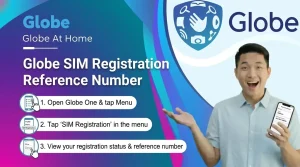
How do I check my Globe SIM registration reference number?
After verifying your SIM, you will get a reference number. If you forget it:
- Check your SMS confirmation
- Check your GlobeOne App
- Contact Globe support if you still cannot find it
How do I register my Globe SIM using 8080?
To register your Globe SIM via 8080, type SIMREG followed by your Globe number, then send it to 8080. You will receive a confirmation message once your SIM is successfully registered.
How do I register for TM?
For TM SIM registration, you can register online via the Globe SIM registration portal, through the GlobeOne App, or at a TM store. Prepaid and postpaid TM SIMs must also comply with the SIM Registration Act.
Can I register my new SIM?
Yes! All new SIMs, including Globe Prepaid, Postpaid, Platinum, and Globe at Home, must be registered before you can use calls, texts, or data. Simply follow the online, app, or in-store registration steps.
How do I register for GoUNLI350 via text?
If you have your ID and personal details ready, online registration usually takes 5 to 10 minutes. Most of the time, verification is instant, but sometimes it may take a little longer.
Some Go promos like GoUNLI350 can be registered via text if your SIM supports it:
- Open your messaging app
- Type the registration code (usually GOUNLI350)
- Send it to the promo shortcode provided by Globe
- Check with Globe for the official SMS code, as it may change